
sgl-router, SGLang’s router, for production-grade DP deployments.
Data Parallelism (DP)
Data Parallelism (DP) is the most common parallelism strategy that replicates the entire model across multiple GPU sets and processes different batches of requests in parallel. Each GPU set handles independent requests. With dedicated routing strategies, as we will introduce later, with those proper routing algorithms insgl-router, the throughput of your serving system could be multiplied nearly linearly.
Key characteristics
- Each replica has a full copy of the model
- Requests are distributed/scattered across replicas
- No inter-replica communication during one request’s inference (for simple DP)
Data Parallelism Attention (DPA)
Data Parallelism Attention (DPA), also known as DP Attention, is an advanced parallelism strategy. While DPA provides the most significant benefits for Multi-Head Latent Attention (MLA) models (such as DeepSeek, MiniMax, Kimi-K2), it also supports standard attention models like Qwen.The Problem with Tensor Parallelism for MLA Models
The most common parallelism strategy for inference is Tensor Parallelism (TP). However, TP might not be the most efficient strategy for certain models. For example, DeepSeek models use MLA and only have one KV head. If we use tensor parallelism on 8 GPUs, it will lead to:- Duplicated KV cache across all GPUs
- Unwanted memory usage that limits batch size
- Reduced throughput due to memory constraints
How DPA Works
DPA addresses these limitations by applying data parallelism specifically to the attention component.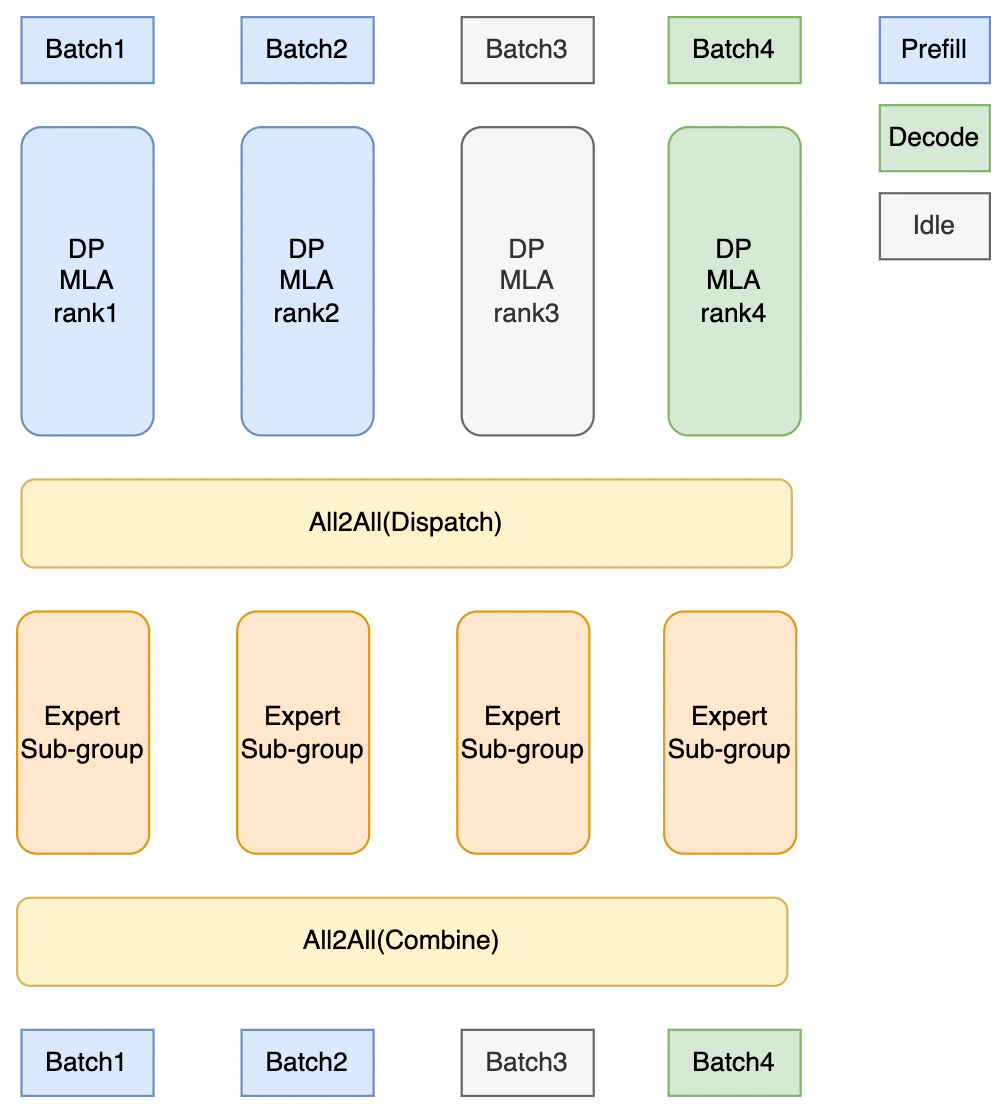 | Each DP replica:
Communication patterns in DPA + EP:
|
Key benefits of DPA
- Significantly reduced KV cache memory: Each DP replica only stores KV cache for its own batches
- Larger batch sizes: Memory savings enable larger batch sizes
- Improved decoding throughput: Significant throughput gains for MLA-based models
- Independent forward modes: Each DP replica can be in different forward modes (prefill, decode, or idle) and handles its assigned batches independently during attention computation
DPA with Expert Parallelism for MoE
For MoE models like DeepSeek, DPA is often paired with Expert Parallelism (EP) for best throughput at scale. However, DPA does not require EP: you can enable DPA without EP if your deployment does not need expert sharding.- Distribute 256+ expert weights across GPUs (cannot fit on a single GPU)
- Enable efficient all-to-all token routing via DeepEP
- Scale to large clusters (up to 5x throughput improvement over vanilla TP)
Recommended setup for DeepSeek
Note:For detailed EP configuration (DeepEP, Two-Batch Overlap, EPLB), see Expert Parallelism.--attn-dp-sizesets the number of attention data-parallel groups inside the TP group. Ifattn_dp_sizeis 1 (default), DPA is disabled.
Target Models
DPA supports the following model architectures:-
MLA (Multi-Head Latent Attention) models - where DPA provides the most significant benefits:
- DeepSeek family (DeepSeek-V2, DeepSeek-V3, DeepSeek-R1)
- MiniMax models
- Kimi-K2
- Other models using MLA architecture
-
Standard attention models - also supported:
- Qwen models (see PR #6121)
--attn-dp-size N (N > 1) to your server launch command.
Activation Logic
DPA is enabled explicitly via server arguments (CLI or config) with--attn-dp-size (alias --attention-data-parallel-size). It creates N attention data-parallel groups inside the TP group, one scheduler each, while the FFN stays tensor parallel:
--attn-dp-size must be greater than 1 for DPA to work. When attn_dp_size == 1 (default), DPA is disabled. The constraint tp_size % attn_dp_size == 0 must also be satisfied. --dp-size only sets the number of data-parallel replicas of the model; combining replicas (--dp-size > 1) with DPA is not supported.
Deprecated:Elastic EP scale joiners. A rank that joins an existing DPA deployment through elastic EP scale-up runs DPA even when it is launched with--enable-dp-attentionstill works:--dp-size N --enable-dp-attentionresolves to--attn-dp-size N --dp-size 1and prints a deprecation warning. Use--attn-dp-size Ninstead. The flag will be removed after 2026-12-31. Under DeepSeek context parallelism (DSA, MLA, and DeepSeek-V4 prefill CP),--dp-size Nalone still runs N attention-DP groups, and logs a deprecation warning; it will be rejected after 2026-12-31. Use--attn-dp-size Nthere too.
--attn-dp-size 1: its own attention DP group is one rank wide.
DP rank count. The number of DP ranks (one scheduler each) is dp_size × attn_dp_size; one of the two is always 1.
/server_inforeportsdp_size(replicas) andattn_dp_sizeseparately, so under DPA itsdp_sizeis 1. Until the flag is removed, its deprecatedenable_dp_attentionfield still reports whether DPA runs; new clients should readattn_dp_size.- Wire formats that predate
--attn-dp-sizekeep the keydp_sizefor the DP rank count: KV-event descriptors, the PD prefill server info, and load snapshots.
TP LMHead with all-to-all
dp-lm-head keeps full weight and computes the local batch, making the gemm inefficient when batchsize per-rank is small. The existing tp-lm-head improves the gemm efficiency but introduce heavy allgather communication on full vocabulary.
Therefore, all-to-all can be applied to eliminate the heavy allgather while retaining the gemm efficiency under small per-rank batchsize. Each rank will send and receive only the local rows with sharded vocab, which is more lightweight.
This optimization is enabled by default for decode node and pure DPA. Users can use --no-enable-tp-lm-head-all-to-all to opt out, or --enable-tp-lm-head-all-to-all for force enabling.
Standard DP for MLA models
Note that MLA models, of course, also support DP. Suppose you want to enable standard DP for MLA models. First, launch each MLA model’s replica independently. You may launch these replicas one by one with DPA enabled. After launching each MLA model’s replica, launchsgl-router and connect all the replicas to it. A detailed explanation of sgl-router is as follows.
Data Parallelism with sgl-router
Native DP Mode
Native DP (built-in Data Parallelism) in SGLang creates multiple worker processes within a single SGLang instance, under the control ofDataParallelController with the launching parameter of dp-size.
- Built-in in-process load balancing only (e.g.,
round_robin,total_requests,total_tokens) - No cache-aware routing
- Limited observability and metrics
- No fault tolerance or circuit breakers
- Not suitable for production workloads
sgl-router to power up your data parallelism in any use case.
sgl-router-Based DP (Recommended)
sgl-router is SGLang’s router, written in Rust to keep routing overhead low. It serves one model and spreads its requests across that model’s SGLang servers, picking a server per request from live load, KV-cache prefix matches, or session affinity. It also routes prefill/decode disaggregation (see PD Disaggregation); this doc only discusses its usage in DP routing.
We strongly recommend running separate SGLang servers behind sgl-router for production-grade Data Parallelism. This provides significant advantages over native DP mode.
Advantages of sgl-router-Based DP:
| Feature | Native DP | sgl-router-Based DP |
|---|---|---|
| Load Balancing | Built-in in-process methods | Advanced policies (cache-aware, power-of-two, etc.) |
| Cache Awareness | ❌ No | ✅ Yes - significantly higher cache hit rate |
| Throughput | Baseline | Significant improvement |
| Multi-Node Support | Limited | ✅ Full support |
| Worker Health Monitoring | Basic | ✅ Circuit breakers |
| Reliability | Basic | ✅ Retries, admission limits |
| Observability | Basic metrics | ✅ Prometheus metrics |
| Hot Worker Add/Remove | ❌ No | ✅ Yes (Kubernetes service discovery) |
Cache-Aware Routing Performance
Cache-aware routing significantly improves performance for workloads with shared prefixes:| Metric | Without Cache-Aware | With Cache-Aware Routing |
|---|---|---|
| Throughput (token/s) | 82,665 | 158,596 (+92%) |
| Cache Hit Rate | 20% | 75% (+275%) |
When to Use Each
Use Native DP when:Never use Native/Naive DP- Learning material of DP routing
- In any case, when you think DP is needed
- Production deployments
- Multi-node distributed setups
- Workloads with shared prefixes (high cache reuse potential)
- You need high availability and reliability features
- You require detailed observability and metrics
- You want to have highly efficient RL rollout systems
Quick Start For sgl-router
Installationsgl-router is pre-installed on the PATH of the SGLang Docker images. If you installed SGLang from source, build it from the sgl-router directory of the SGLang repository (this needs a Rust toolchain, e.g., from rustup) and put it on your PATH:
--kv-events-config publishes the KV-cache events that the cache_aware policy builds its prefix tree from, and --load-publish-endpoint auto publishes the load reports that load-aware routing reads. On a single node, give each server its own GPUs (--base-gpu-id), --port, and KV-event endpoint port.
--model-id must match the servers’ model name, which is their --served-model-name, or their --model-path when that flag is not set. The router loads the tokenizer for --model-id from Hugging Face; for a local checkpoint, pass --tokenizer-path /path/to/checkpoint/tokenizer.json. Wait for curl http://localhost:30000/readiness to return HTTP 200, which means the workers are registered.
Elastic deployments on Kubernetes
For deployments where workers are added and removed dynamically, sgl-router can discover them from Kubernetes EndpointSlices instead of a static --worker-urls list. --selector matches the labels of the workers’ Service:
Load Balancing Policies
sgl-router supports multiple load balancing policies:
| Policy | Description | Best For |
|---|---|---|
cache_aware | Combines cache locality with load balancing | Recommended for most workloads |
round_robin | Cycles through workers in order | Simple, predictable distribution |
random | Random worker selection | Baseline, testing |
power_of_two | Samples two workers, picks lighter one | Low latency requirements |
- Maintains a radix tree of each worker’s cached prefixes, built from the KV-cache events the workers publish
- Routes requests to the worker with the longest cached prefix of the prompt, if it matches at least
--cache-affinity-min-matched-tokenstokens - Falls back to
power_of_twowhen no worker has such a prefix or the preferred worker is at an admission limit; with--affinity-mode balanced, it also switches away from the preferred worker when that worker is much more loaded than an alternative (--affinity-load-factor,--affinity-load-gap)
Best Practices
- Start with
cache_awarepolicy - It provides the best balance between cache locality and load distribution for most workloads - Use sgl-router for production - Prefer separate servers behind
sgl-routerover a singlesglang.launch_server --dp-sizefor better reliability and observability - Enable retries and keep the circuit breaker -
--retry-max-attemptsresends a request that failed before any response to another worker, and a worker leaves routing after--cb-thresholdconsecutive failures until it recovers
sgl-router --help and the sgl-router README.
Verifying Traffic Distribution
After launchingsgl-router, verify that traffic is being distributed correctly:
1. Check that the workers are registered:
Reference
| Strategy | Use Case | Key Benefit |
|---|---|---|
Native DP (—dp-size) | Never | Easy to understand, not rust based |
| sgl-router-Based DP | Production (recommended) | Cache-aware routing, high availability |
DPA (—attn-dp-size N) | DeepSeek/MLA models | Eliminates KV cache duplication, improved throughput |
| DPA + EP | DeepSeek MoE models | Significant throughput improvement vs vanilla TP |
- Enable DPA for attention layers (
--attn-dp-size 8) - Enable EP for MoE layers (
--ep 8 --moe-a2a-backend deepep) - Use sgl-router with cache_aware policy
- Expert Parallelism - DeepEP, Two-Batch Overlap, EPLB
- sgl-router README - router configuration & routing policies
- Large-Scale EP Blog - 96 GPU deployment guide